Skip to content
LaunchKitSearch
ProductsBusiness typesGuidesCartFind my business
Cart
Home›Products›Business Documents›Premium
Electrician Business Documents — Premium product preview

Electrician

Electrician Business Documents — Premium

Keep six core business forms ready to fill, edit, save, and reuse.

21 files · two downloadsInteractive fillable PDFsEditable Word filesFill-online browser forms

$19.99One-time purchase · USD

Recommended for fill-on-screen PDF workflows

Straight to secure checkout · download links emailed after paymentBuy more than one product together

Recommended for fill-on-screen PDF workflows

See inside ↓

Review and adapt the files for your business. Not legal, tax, or accounting advice.

  • How the files arrive. After payment, a confirmation email containing your download links is sent to the email address you give at checkout.
  • Faulty or not as described? Contact us within 14 days of purchase. Where a file is confirmed defective, we provide a corrected replacement file.
Read the refund policy →

Questions before you buy? Contact us

How LaunchKit products are built

Real-world example

See a real-world example of how the documents work

A silent walkthrough of the Client Registration form, filled in on screen.

Your browser cannot play this video.

Made for the work

Paperwork built around electricians.

Electrical work often spans more than one visit. A panel upgrade can mean a utility disconnect, a rough-in, an inspection and a return trip to finish, while a simple service call can turn up old wiring the customer did not know about. These forms give each visit and each finding a written record, so whoever goes back to the job knows what was done and what is still open.

Keep six core business forms ready to fill, edit, save, and reuse.

Premium gives you the 15-file document pack — six interactive fillable PDFs, six editable Word files, and three setup guides — plus a second download with six fill-online forms you complete right in your browser: 21 files across two downloads.

No software needed, the browser forms work offline, and your answers stay on your device. Save as PDF or print on US Letter whenever you need a copy.

On an electrical job the paperwork should follow the work from the first call to the invoice. Log the request on the Customer Inquiry form, register the customer before the visit, record each panel upgrade, outlet install or ceiling fan install in the Service Log, and run the Invoice Checklist before you bill. The Daily Operations Checklist and Internal Staff Notes keep the crew's day in order, and every form comes as interactive PDFs, editable Word files and a browser version you fill online.

Free guide: Electrician Service Call Paperwork: Booking to Invoice

Is this for you?

Made for electricians handling installs, upgrades, and service calls.

Choose Premium if you want interactive PDFs you can complete field by field on screen, editable Word masters and format-specific setup guides, plus six customizable fill-online forms in a second download.

Electrician in practice

How electricians can use it.

  • ✓Writing up a request for an EV charger: where the car parks, the distance to the panel, and whether the customer has other upgrades in mind.
  • ✓Noting what you found on a service call, such as an ungrounded outlet or a double-tapped breaker, and what you told the customer about it.
  • ✓Tracking a job through permit, rough-in inspection and final, with each date, after checking with your local building department on what the job calls for.
  • ✓Recording which breakers you labeled or relabeled after adding circuits, so the panel directory matches the work you left behind.

Start with these

The parts electricians reach for first.

  • Customer InquiryFor the call before an estimate: the work they want, the age of the home, where the panel is, photos they can send, and whether they own or rent.
  • Internal Staff NotesFor handing a job between you and an apprentice: what was roughed in, what is waiting on inspection, and which circuits are not yet energized.
  • Editable Word filesAdd the lines your shop uses, such as permit number, inspection result or panel brand, then put your company name and license number in the header.

In the pack

What’s inside Premium.

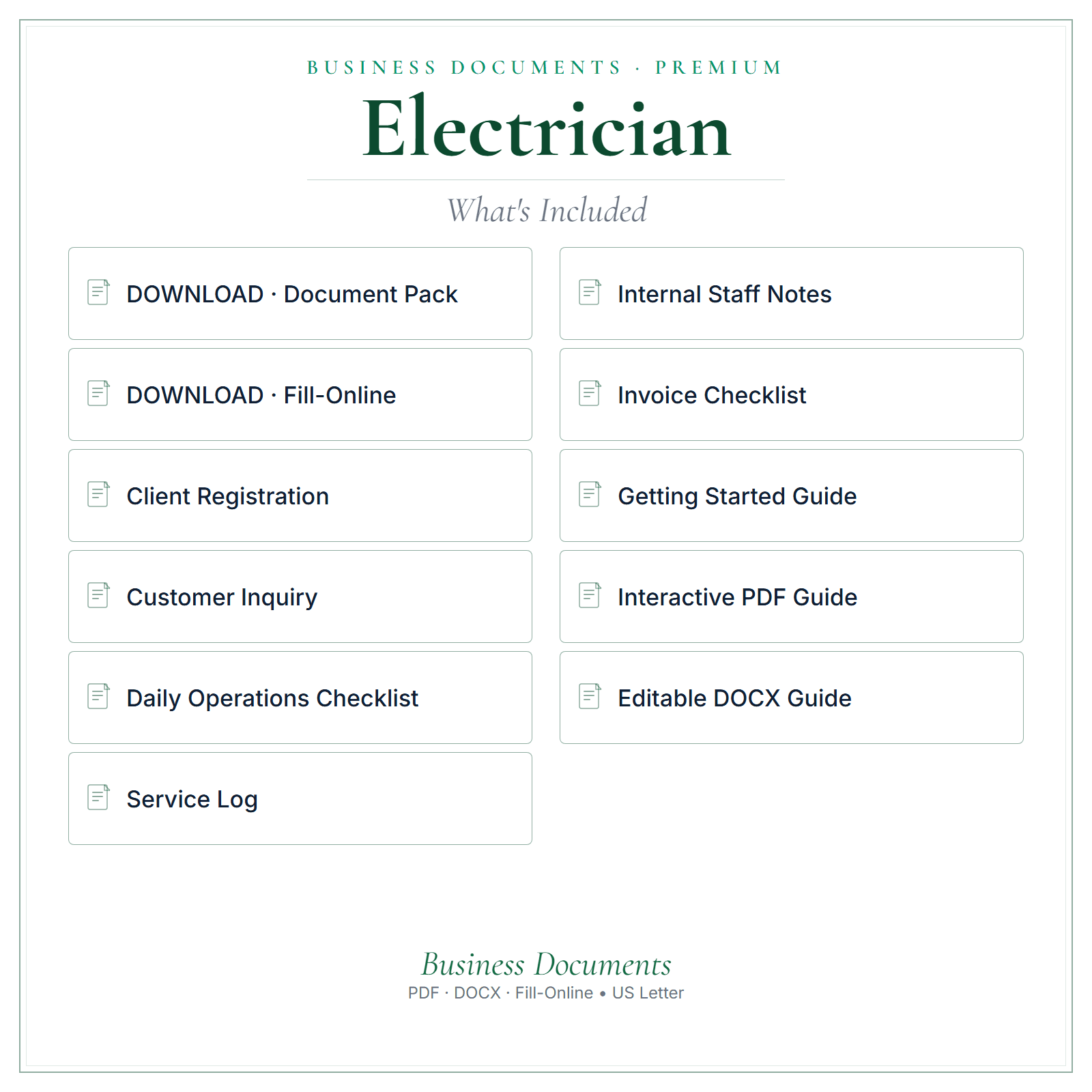
  • ✓Six core business forms: Client Registration, Daily Operations Checklist, Service Log, Customer Inquiry, Internal Staff Notes, Invoice Checklist
  • ✓6 interactive fill-on-screen PDFs — type directly into the fields, save, and print
  • ✓6 fully editable Word (DOCX) versions — change wording, add your logo, make them yours
  • ✓Two format-specific PDF usage guides — one for the interactive PDFs, one for the Word files
  • ✓One getting-started PDF with setup guidance
  • ✓Six fill-online forms in a second download — open them in any browser, type on screen, and save as PDF
  • ✓No software needed: the browser forms work offline and your answers stay on your device
  • ✓21 files across two downloads
What's included in Electrician Business Documents — Premium

A stronger routine

Why choose Premium.

  • ✓Type into the interactive PDFs, then save a completed copy
  • ✓Edit wording, add your logo, and adjust the Word files to suit your business
  • ✓Fill in the six browser forms on screen, then save as PDF or print on US Letter
  • ✓Work offline with no software to install, and keep your answers on your own device
  • ✓Keep a clean master set ready for repeat use
  • ✓Use the PDF usage guides and getting-started PDF when you set the files up

From file to workflow

How it works.

  1. 1Download links are emailed after payment
  2. 2Open the interactive PDFs to type on screen, or the Word files to fully edit
  3. 3Save your version, add your business name, and use it in your business

Exact file types

21 files across two downloads: 6 interactive fillable PDFs, 6 editable Word (DOCX) files, 3 setup guides, and 6 fill-online HTML forms you complete in your browser. Word files edit best in Microsoft Word. The browser forms need no software, work offline, and keep your answers on your device.

See inside

See the files before you decide.

Preview the structure, formatting, and presentation of the product. The exact included files are listed above.

Any business or customer names, dates, and amounts in these pictures are examples.

  • A closer look
  • What’s included
  • At a glance
Select a picture to see it larger.

Before you choose

Good to know.

Download links are emailed after payment. The interactive PDFs let you type and save; the Word files let you fully rebrand. This is a template/reference product, not legal, tax, accounting, or state-specific advice — review and adapt it for your business before use. About the browser forms: each form saves its own answers and business details in your browser, so you'll need to enter your business details in each form. Answers you haven't changed for 60 days are deleted the next time you open the form. Prepare client copy and Prepare clean team copy clear the answers saved in that form.

Questions electricians ask

Using the Electrician Business Documents — Premium.

How do I record a job that needs more than one visit?

Log every visit separately in the Service Log: the date, the stage, such as rough-in or trim-out, who was on site and what is left. Add the inspection date and result once you have them. When someone else goes back to finish, the entries show where the job stands without a phone call to you.

Should I write down problems I find but was not hired to fix?

Some electricians do. Note what you saw, where it was, and what you told the customer, with the date and time. Write whether they asked you to quote it, said no, or wanted to think about it. That record helps if the issue comes up later, and it gives you a reason to follow up.

Can my apprentice fill in the forms on a separate tablet?

Yes, the browser forms open in any browser on that tablet, but anything typed there stays on that tablet and will not show up on your laptop. Have the apprentice save a PDF of every filled form and send it to you, or keep one tablet in the truck for the whole crew.

What goes on the Invoice Checklist for a panel upgrade?

List each part of the job before you bill: the panel and breakers, wire and fittings, labor hours, any permit fee, and a return trip if the inspection called for one. Check it against the estimate the customer accepted and note any change they agreed to along the way. The customer sees your invoice; the checklist stays with you.

Common questions

Before you buy.

How do I get the files after I pay?

After payment, a confirmation email containing your download links is sent to the email address you give at checkout. Nothing is shipped.

Which file types are included?

21 files across two downloads: 6 interactive fillable PDFs, 6 editable Word (DOCX) files, 3 setup guides, and 6 fill-online HTML forms you complete in your browser. Word files edit best in Microsoft Word. The browser forms need no software, work offline, and keep your answers on your device.

Is this a one-time purchase?

Yes. $19.99 is a one-time purchase, paid in US dollars.

Can I get a refund?

Digital sales are final once the download has started. If a file is faulty or materially different from what this page describes, contact us within 14 days of purchase. Where a file is confirmed defective, we provide a corrected replacement file.

Is this legal, tax, or accounting advice?

No. Review and adapt the files for your business, and get qualified advice where you need it.

Complete your toolkit

Other tools for electricians.

See all Electrician products and tools →

Pricing CalculatorElectrician Pricing Calculator$14.99 one-timeAn editable Excel calculator to work from your costs and build clearer quotes.
View product →Buy more than one product together
AI Copy KitElectrician AI Copy Kit$14.99 one-timeReady-to-edit marketing copy and AI prompts for posts, emails, replies, and follow-ups.
View product →Buy more than one product together
Startup GuideElectrician Startup Guide$7.99 one-timeA practical PDF guide to help plan setup, pricing, and your first customers.
View product →Buy more than one product together
Price List & Service MenuElectrician Price List & Service Menu$4.99 one-timeAn editable price list and service menu for presenting your services and prices clearly.
View product →Buy more than one product together

Add all 4 above with this product for one checkout: $62.95 in total. Download links are emailed after payment.

Keep exploring

More for electricians.

Other Electrician products

  • Electrician Pricing Calculator
  • Electrician AI Copy Kit
  • Electrician Startup Guide
  • Electrician Price List & Service Menu
  • Electrician Client Tracker
  • All Electrician products and guides

Business Documents for other businesses

  • Handyman Business Documents — Premium
  • Plumber Business Documents — Premium
  • HVAC Contractor Business Documents — Premium
  • Home Inspector Business Documents — Premium

Free reading

Guides for electricians.

Free reading on the same subject, written for US small businesses. Every guide is general information, not legal, tax, or accounting advice.

PricingHow to Bid Electrical Jobs: A Step-by-Step EstimateA good electrical bid is five numbers added up: labor hours × your hourly rate, materials plus markup, permit and inspection fees, a contingency, and profit. Get the hours from your own past jobs,…PaperworkElectrician Service Call Paperwork: Booking to InvoiceKeep one job reference from the first call through the final invoice. Record the reported problem, explain diagnostic charges, document the authorized scope, agree changes before extra work, and make…PaperworkElectrician Insurance: What You Need and What It CostsInsureon's median premiums for electricians who buy through it are $61 a month for general liability ($732 a year) and $275 a month for commercial auto ($3,304 a year), updated July 28, 2026. Most…MarketingMarketing for Electricians: Where to Advertise and What WorksFor most small electrical shops, the best leads come from repeat customers who send you work: general contractors, remodelers, property managers, and homeowners who liked your last job. Build those…PricingHow Much Should an Electrician Charge per Hour?Homeowners typically pay $50 to $100 an hour for a qualified electrician, with the first hour often around $150 because it covers the trip, according to Angi's 2026 cost guide. Master electricians…

More guides on this subject

  • How to Start a Small Business in the US: A Practical Checklist
  • EIN for a Small Business: When You Need One and What to Prepare
  • Small-Business Recordkeeping Checklist: What to Capture Each Week
  • Business Licenses and Permits in the US: A Search Order That Works
Read all US small-business guides →

Get the full editable bundle today and make these forms your own.

Straight to secure checkout · download links emailed after paymentBuy more than one product together

LaunchKit

Practical digital products made around the needs of US small businesses.

Explore

All productsBusiness typesSmall-business guidesWhat should I charge?Free toolsFind my business

Products

Business DocumentsPricing CalculatorAI Copy KitStartup GuidePrice List & Service MenuClient Tracker

Company

AboutHow it is builtContact usLegal & policies

Legal

Terms of ServicePrivacy PolicyRefund PolicyShipping & delivery

LaunchKit — operated by Kevin from the United Kingdom. office@yourlaunchkit.net

© 2026 LaunchKit